
Emergency calls don’t follow a script. Information comes in incomplete, callers are distressed, and situations shift mid-sentence. In those moments, dispatchers have to gather critical details, make structured decisions, and communicate clearly under pressure, all at once.
NECI 9-1-1 provides a protocols application designed to support this process, translating standardized emergency procedures into step-by-step scripts and decision flowcharts.
But in practice, the system didn’t fully match the reality it was meant to support. Dispatchers weren’t moving through calls linearly, they were jumping between steps and navigating information dynamically based on what they were hearing in real time. The interface, however, remained rigid.
This project focuses on redesigning that experience for speed and flexibility in moments where there’s no room for error.
Product Designer
Figma
Aug - Sept 2024
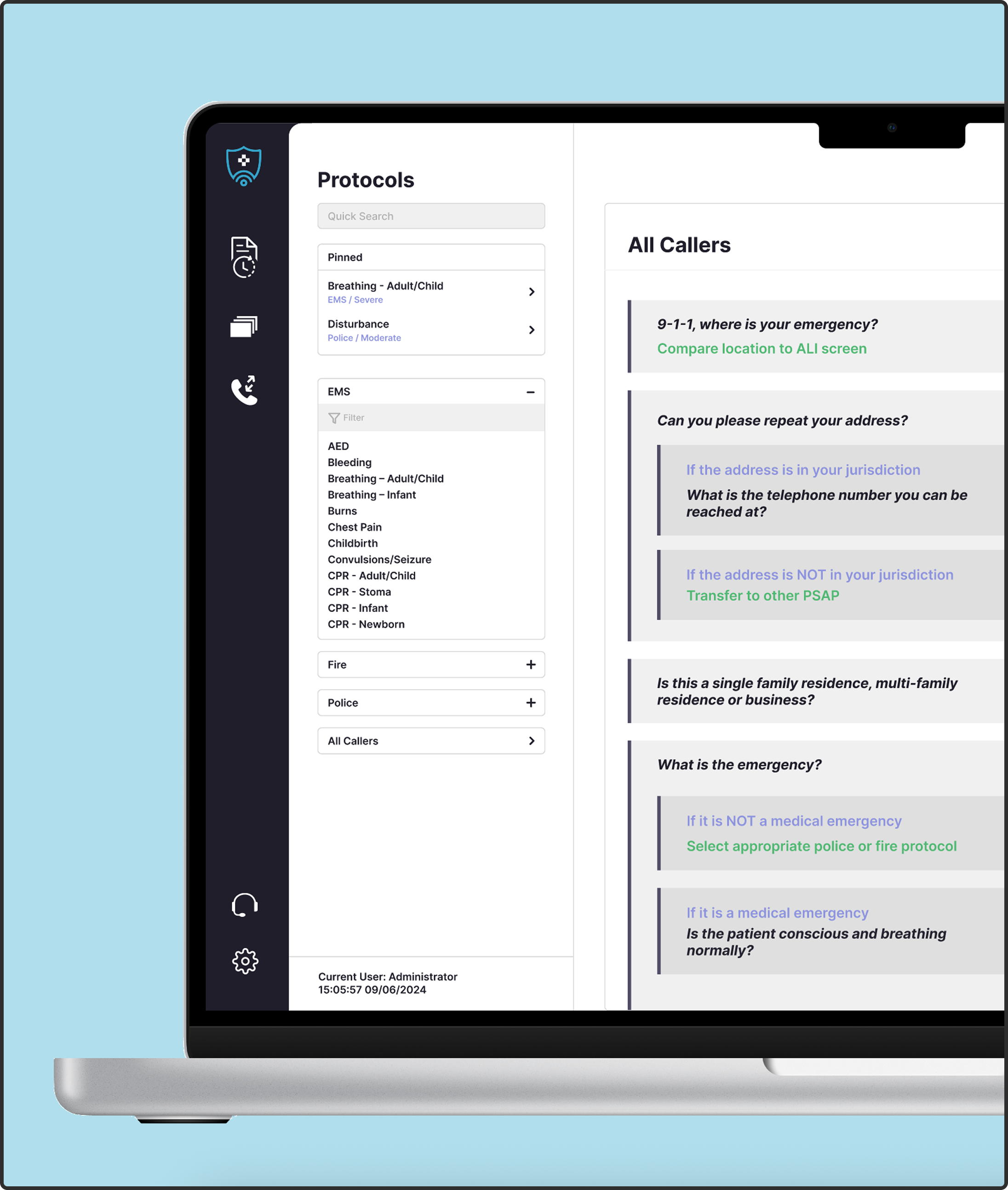

At first, the ask was framed as a simple UI refresh. But on closer inspection, the challenge wasn't visual it was behavioural.
The legacy system was built around rigid, structured protocols, assuming dispatchers would move through calls step-by-step. In reality, emergency calls are chaotic and non-linear. Dispatchers must move dynamically: jumping between steps as new information emerges, switching between scripts, and adapting their communication based on a panicked caller.
This created a massive disconnect: the system enforced structure, while the work demanded flexibility.
Yet, the guardrails couldn't be compromised. The interface needed to be instantly learnable, highly reliable, and controlled enough to prevent deviation from regulated safety protocols all while supporting split-second, real-time decisions.
Too much structure slows users down. Too much flexibility increases the risk of error.
As the Product Designer, my goal was to bridge this gap: to preserve the rigorous structure of the protocols while allowing dispatchers the fluidity to navigate them under intense pressure.
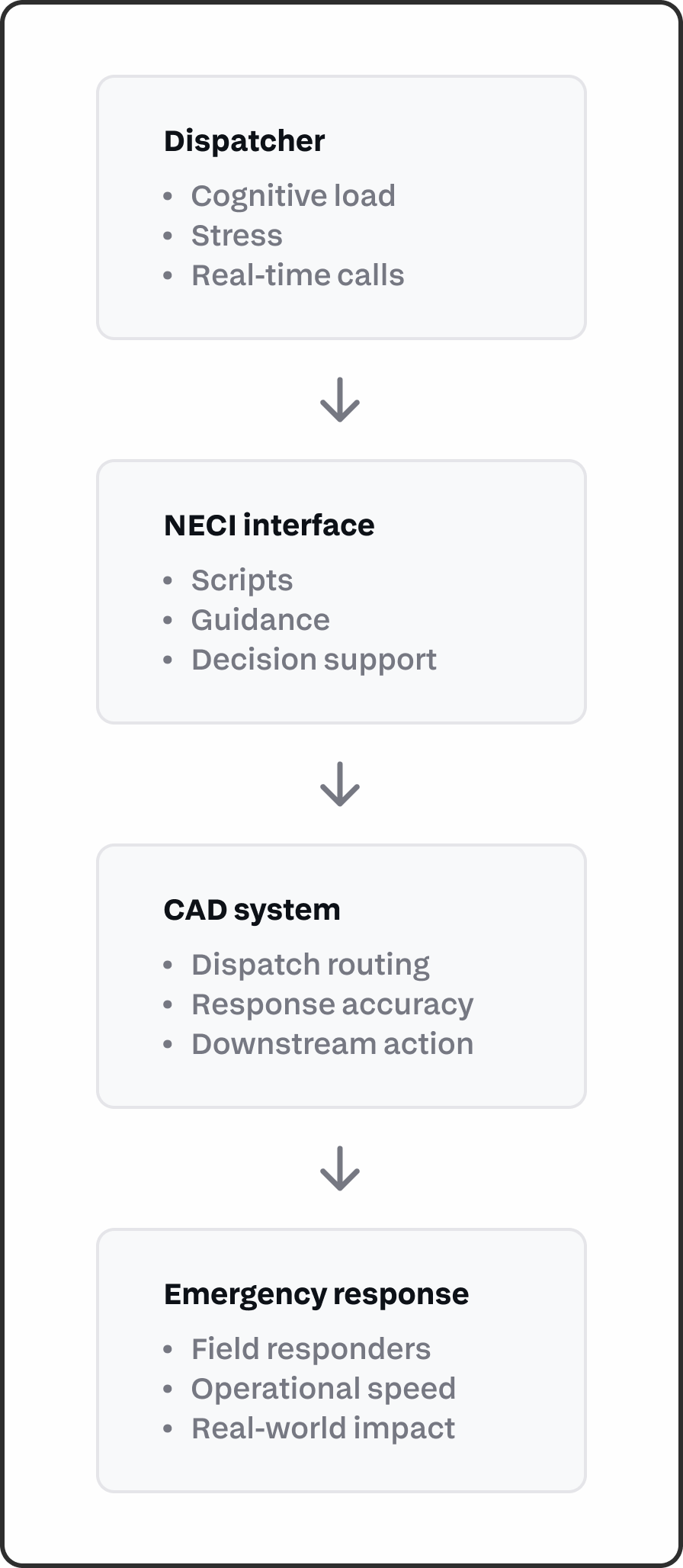
The deeper I looked into the product, the clearer it became that this tool didn't exist in a vacuum. It was one piece of a high-stakes emergency response workflow shaped by dispatcher psychology, strict training requirements, and downstream Computer-Aided Dispatch (CAD) systems.
Every interaction inside our product directly impacted the speed and accuracy of the downstream response. By mapping this ecosystem, the project reframed itself: we weren't just building a scripting interface. We were designing a real-time decision support system operating upstream of another critical tool.
While the legacy interface felt outdated, its underlying logic had a strong foundation. The simplicity was intentional: the original scripts and flowcharts provided crucial guardrails that minimized cognitive load during a crisis. The challenge was not to reinvent the wheel or disrupt what already worked, but to evolve the interaction layer to mirror how dispatchers actually think and act.

However, that same simplicity introduced severe operational friction. The interface lacked clear visual hierarchy, feedback, and flexibility. Information felt scattered, navigation remained rigidly linear, and key actions failed to reflect their actual importance within the workflow. In critical moments, the UI itself became a bottleneck that slowed users down.
This realization led to the core design question of the project:
How might we modernize the interface to allow for dynamic flexibility without compromising the speed, safety, and strict compliance the system depends on?
To guide the redesign, I grounded every decision in five product principles shaped by the high-stress realities of emergency response work
With these principles defined, I analyzed the core entry point of the experience: the protocol navigation menu. While it was consistently placed, its execution introduced severe operational bottlenecks:
Zero Visual Hierarchy: Making it incredibly difficult to scan, prioritize, or locate critical options during an active crisis.
Arbitrary Organization: Protocols were grouped with little indication of operational importance or clinical relationship.
Lack of Contextual Feedback: The system offered minimal state changes, leaving dispatchers uncertain of their location within a flow.
Rigid Linear Construction: The menu assumed a static workflow, failing to support the dynamic nature of actual emergency calls.
More importantly, the navigation didn’t feel like part of the experience, despite being central to it. This revealed a key opportunity. The navigation was not just a menu. It was a core part of how dispatchers think and move through a call.

I focused on three areas that would have the greatest impact on speed and usability.


What I chose not to do
I intentionally avoided over-engineering the solution. While automated triggers or predictive AI features were explored during ideation, I deprioritized them for this initial phase.
In emergency dispatch, predictability equals safety so introducing unproven automation risked compromising the absolute reliability the system depends on.
This project reshaped how I think about improving products. What initially looked like an outdated system revealed itself as something more intentional. Many of its decisions were rooted in the realities of emergency response work, where clarity, predictability, and speed matter more than innovation.
The challenge was not to replace the system, but to evolve it without losing what made it effective.
It also pushed me to think more deeply about designing for high-pressure environments, where time is limited and errors carry real consequences. In these contexts, good design is not about adding more. It is about removing friction without removing structure.
More importantly, it reinforced the value of asking the right questions early. Understanding the broader system, constraints, and user behaviour shaped every design decision and prevented surface-level solutions.
Although the project did not move forward due to budget constraints, it strengthened my ability to design systems that support real-time decision making, not just interfaces.